DevelopMENTAL Madness

Thursday, May 21, 2009

Lost in Translation: Oracle 10g2 client hell

This is a post I’ve been meaning to write for a while. I had quite a bit of trouble getting the Oracle client working properly since I started with my current client. I’ve never used Oracle before and so it’s been pretty frustrating since I’ve wanted the opportunity to work with it for a long time. But it turns out that the solutions have been pretty simple. Here’s a list of some of the problems I’ve run into and their solutions:

  1. Use Admin install – When it comes to software/services that open up ports to the outside world I’m a fan of installing only what I need. So I was disappointed when our DBA told me that my first problem was that I needed the Admin install and that Instant client didn’t have everything I needed. But I’m thinking I’ll try Instant Client again now that I’ve resolved my other problems which I think were the cause. If I ever get around to it, I’ll update this post.
  2. Make sure you have Vista installer – I was given an installer for Oracle client that was stored on my client’s LAN, so that was the one I used. But it turns out that the installer wasn’t compatible with Vista. Oracle has a specific client for both the 32-bit and 64-bit versions of Vista. Make sure you’re using the right installer.
  3. Make sure ORACLE_HOME environment variable matches the path to your client installation (the parent folder of your bin directory). You need to make sure the correct values are in the following places:
    • HKLM\Sofware\Oracle\ORACLE_HOME – this should be the path of your oracle home folder (the parent folder of your bin directory, but not including “\bin”). If you accepted the defaults during installation it should be something like: C:\oracle\product\10.2.0\client_1
    • PATH environment variable – this should be the full path to the “bin” directory. Using the same setup as above this should be: C:\oracle\product\10.2.0\client_1\bin.
    • Also, you may need an ORACLE_HOME environment variable. You can add this and assign it the same value as the registry key above.

Errors

Can not load Oracle client library oci.dll from home

I had this problem trying to load TOAD and when I finally thought about it things made sense. TOAD couldn’t find the bin directory based on the paths in PATH and ORACLE home. Make sure you check #3 above to verify all this is correct.

I also had a variation on this error when I was running a 64-bit OS. You’d think you should install the x64 Oracle client if your OS is 64-bit. But since TOAD is a 32-bit client you’ll need to install the x86 Oracle client. (See #2 above)

Can not load Oracle client. Check your PATH environment variable and registry settings

This was the error I got from DevArt’s dotConnect client for .NET Entity Framework. Unfortunately, the problem here was still causing me headaches even after I got the paths right. I also had to make sure that I had the Vista client installed. Once I did this, I no longer had this problem.

Labels: ,

Monday, February 02, 2009

Lost In Translation – Episode 3: Users and Schemas

In my last post I mentioned I would be addressing tables next, but as I read through the documentation I realized something. Because Oracle doesn’t have the same concept of databases as SQL Server I need to use schemas to segregate my data. In order to create a schema you must create a user. When you create a user in Oracle, a schema is implicitly created. Which means I need to create a user so I can place my tables and other database objects into a schema.

I’ll be using scripts in this episode instead of screenshots because scripts are more concise. There are multiple screens to each object and I didn’t want to clutter this post with too many screen shots. The scripts here are pretty simple and you should be able to translate them into options in the Enterprise Manager UI.

Create a User

Creating a user isn’t particularly difficult: you name the user and select a password, then you assign the user a default tablespace and temp tablespace. The following script accomplishes this for you:

CREATE USER Northwind
  PROFILE DEFAULT 
  IDENTIFIED BY "password"
  DEFAULT TABLESPACE MyFirstOracleDb 
  TEMPORARY TABLESPACE TEMP 
  QUOTA UNLIMITED ON MyFirstOracleDb 
  ACCOUNT LOCK;

If you use the Oracle Enterprise Manager tool your user will be automatically granted privileges to connect. I’ve left that out of the script because I am simply creating a schema for my database objects.

QUOTA is a way of allocating space limits to a user. If you forget this you won’t be able to create any tables or other objects in this schema because by default the user gets allocated nothing and cannot do anything until an allocation limit is specified.

You’ll also notice that my CREATE USER statement ends with “ACCOUNT LOCK”. Again, right now I’m creating a user for the schema, I don’t plan on allowing this user to login. I’m not sure what the recommended practice here is, but I did read that when you want to delete a user you have to delete the schema and all associated objects with it. So I plan on placing all my objects into schemas which are not associated with an active user. This will allow me to manage users without worrying about affecting my database objects.

An important thing to note is that you need to be careful with quoted identifiers. If you’re using the “Show SQL” button in Enterprise Manager you’ll notice that all object names are quoted. The trouble you’ll run into here is that if you create an object using a quoted identifier you’re always required to use quotes when referencing that object. To quote from the Oracle documentation “Schema Object Names and Qualifiers”:

A quoted identifier begins and ends with double quotation marks ("). If you name a schema object using a quoted identifier, then you must use the double quotation marks whenever you refer to that object.

So if your create user script looks like this:

CREATE USER "Northwind"
  PROFILE DEFAULT
  IDENTIFIED BY "password"
  DEFAULT TABLESPACE MyFirstOracleDb 
  TEMPORARY TABLESPACE "TEMP" 
  QUOTA UNLIMITED ON MyFirstOracleDb 
  ACCOUNT LOCK;

Then your CREATE TABLE script must look like this:

CREATE TABLE "Northwind".Customer ( 
  CustomerID INTEGER NOT NULL , 
  CustomerName VARCHAR2(50) NOT NULL , 
  CONSTRAINT PK_CUSTOMER PRIMARY KEY (CustomerID) VALIDATE 
) ORGANIZATION INDEX TABLESPACE MyFirstOracleDb;

And if your CREATE TABLE script looks like this:

CREATE TABLE "Northwind"."Customer" ( 
  CustomerID INTEGER NOT NULL , 
  CustomerName VARCHAR2(50) NOT NULL , 
  CONSTRAINT PK_CUSTOMER PRIMARY KEY (CustomerID) VALIDATE 
) ORGANIZATION INDEX TABLESPACE MyFirstOracleDb;

Then your SELECT, INSERT, UPDATE and DELETE statements will look like this:

SELECT * FROM "Northwind"."Customer"
INSERT INTO "Northwind"."Customer" ....
UPDATE "Northwind"."Customer"....
DELETE FROM "Northwind"."Customer" ...

Plus, when you use quoted identifiers your object names are case-sensitive. So “northwind” and “NORTHWIND” would both cause errors in your SQL scripts.

When you create your objects in Enterprise Manager they won’t require quoted identifiers and they’ll be case-insensitive. So you’re safe there, just be careful when using Enterprise Manager as a learning tool for writing scripts.

Create a table

I’m not going into go into detail about tables until my next post. For now lets just create a simple table so we can grant our user access to that table. Otherwise our user won’t have permission to do anything but connect. So far, Oracle seems to be really good at not doing anything unless you explicitly tell it too. This can bite you, but as far as security goes it is certainly the right way to do it.

CREATE TABLE Northwind.Customer (
  CustomerID INTEGER NOT NULL,
  CustomerName VARCHAR2(50) NOT NULL,
  CONSTRAINT PK_Customer PRIMARY KEY (CustomerID) VALIDATE
) ORGANIZATION INDEX TABLESPACE MyFirstOracleDb;

Create a role

Since as a general practice it is best to assign privileges to roles and not users, we’re going to go ahead and create a role and grant it permission to access our table:

CREATE ROLE NorthwindPublic NOT IDENTIFIED;
 
GRANT SELECT ON Northwind.Customer TO NorthwindPublic;

Create a application user

Now with a few small differences from our first user we’ll create a user which can connect to our database:

CREATE USER NorthwindUser
    PROFILE DEFAULT
    IDENTIFIED BY "password"
    DEFAULT TABLESPACE MyFirstOracleDb
    TEMPORARY TABLESPACE TEMP
    ACCOUNT UNLOCK;
 
GRANT CONNECT TO NorthwindUser;
GRANT NorthwindPublic TO NorthwindUser;

Here we’ve got an unlocked user, with no quota that can connect to our database and read data from our Customer table. If we want to give the user the ability to modify data we can update the role we created.

Connecting to the database

To connect with our new user, fire up SQL Developer from START –> Programs –> Oracle –> Application Development –> SQL Developer. Then select File –> New… –> Database Connection and enter your information like in the screenshot below:

Oracle_NewConnection

Click connect, then File –> New… –> SQL File. Click OK, then OK again to open a new script file. Type the following in the script window:

SELECT * FROM Northwind.Customer;
Hit F5 and you’ll get a “select connection” prompt. Select the connection we just created and hit “OK”. There won’t be any data, but you should get a success message. Go ahead and play with this for now and I’ll have more on creating tables followed by DML statements in Oracle in the next episode.

Labels: , ,

Thursday, January 29, 2009

Lost in Translation – Episode 2: Tablespaces

Recap

In Episode 1 I addressed database instances but I’d like to correct a technicality. I compared SQL Server instances with Oracle Database instances. While this is pretty much correct, I’d like to add that technically this isn’t correct. At least not according to Oracle’s documentation. If you look on your installation disk for the docs directory I recommend reading the 2 Day DBA document. So far I’m finding it very valuable.

Here’s a quote from the Chapter 2 overview:

After you create a database, either during installation or as a
standalone operation, you do not need to create another. Each Oracle
instance works with a single database only. Rather than requiring that
you to create multiple databases to accommodate different
applications, Oracle Database uses a single database, and
accommodates multiple applications by enabling you to separate data
into different schemas within the single database.

According to the docs, an instance of Oracle is the same as a database. This is really all about semantics here, because I still view my original viewpoint as correct. But I also want to make sure what I post here is correct. To reference my language analogy from the first episode, two words or phrases from different languages can be considered direct translations, but there can often be cases where there is a better translation. That doesn’t make the translation incorrect. That’s the case here and it will be in other comparisons I make. I see it as a many to many relationship between terms in language as well as RDBMS vendors.

Tablespaces

From reading the documentation I would translate the term Tablespace in Oracle as a SQL Server database. To quote from the documentation:

A database is divided into logical storage units called tablespaces, which group
together related logical structures (such as tables, views, and other database objects).

Which sounds like the definition of a database to me. An Oracle instance comes with a set of default tablespaces installed. EXAMPLE, SYSTEM, SYSAUX, TEMP, UNDOTBS1 and USERS.

  • EXAMPLE is an optional tablespace. Example is analogous to Northwind and is used by samples and the documentation to provide guidance and a source for demos.
  • SYSTEM is Oracle’s version of SQL Server’s master database. It is a master catalog of the objects in the database.
  • SYSAUX is a compliment to System and is used to reduce the demand on System by offloading some of its data into a separate data file, which could be placed on separate physical drive to increase system performance.
  • TEMP is basically the same as SQL Server.
  • UNDOTBS1 is related to undo files, which are like SQL Server transaction logs. I’m not real clear on how this tablespace is used with undo files yet, I’m just pretty much rehashing the documentation here.
  • USERS is a user tablespace. If you create a database object and don’t have your own tablespace or don’t specify which tablespace your object will be stored in then it will be stored in USERS. SQL Server doesn’t have an equivalent here. SQL Server requires you to create a user database for your data and when you create an object, unless you use a fully-qualified object name the object you create will be placed in whichever database you’re connected to.

Each of the built-in tablespaces has its own data file and each user tablespace you create will contain one or more data file.

Just to touch on the system tables in SQL Server for a second, SQL Server also has two other system databases named “model” and “msdb”:

  • model is actually attached to an instance of SQL Server and there is no equivalent tablespace in Oracle. However, Oracle does have a different way of accomplishing the same thing. The DBCA has templates you can use, both default and user defined which can be used to create a new Oracle Database Instance.  This is generally the purpose of SQL Server’s model database, to act as a template for new user databases.
  • msdb is where objects like scheduled jobs are stored. I don’t know the exact correlation with Oracle, I imagine these are either in SYS or SYSAUX. But since I don’t know what is stored in the specific system tables in Oracle, I can’t make the comparison at this time.

Creating Tablespaces

Creating a new tablespace using the Oracle Enterprise Manager is much like it is in SQL Server, the options are very similar and once you locate the tools for creating a tablespace the rest should come naturally, assuming of course you’re familiar with how this is done in SQL Server.

If you’re logged into Enterprise Manager, click on the “Server” link located in the top nav bar. Then click on “Tablespaces” under the “Storage” heading.
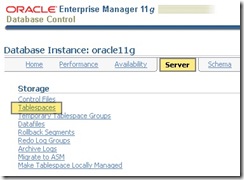
OracleTablespaces

To create a new tablespace, click “Create” located just above the list of tablespaces.
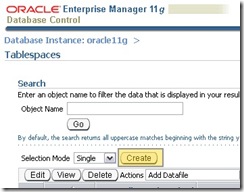
Oracle_CreateTablespace

One the next screen, name the tablespace and accept the default settings. But before saving the settings, you need to add a data file:

Oracle_CreateTablespaceGeneral

After clicking the “Add” button, fill out the file name, check the AUTOEXTEND option and set the amount the file will grow by each time you exceed the currently allocated file space. Unfortunately, Oracle doesn’t have a option to grow by percent, which is what I always select in SQL Server. Once you’re selected the options, click “Continue”.

OracleEM_AddDatafile

Before saving these changes, click “Show SQL” at the bottom right. You can skip this step, of course, but I usually script my own DDL in SQL Server and so I want to learn the syntax by looking at what is generated by Enterprise Manager. Here’s what you’ll see:

CREATE SMALLFILE TABLESPACE "MYFIRSTORACLEDB" DATAFILE 'C:\APP\MARK\ORADATA\ORACLE11\DataFile1' SIZE 100M AUTOEXTEND ON NEXT 10M MAXSIZE UNLIMITED LOGGINGEXTENT MANAGEMENT LOCAL SEGMENT SPACE MANAGEMENT AUTO DEFAULT NOCOMPRESS 

To return to “Create Tablespace”, just click “Return”. Now click “OK” and you’re set. You’ve created your tablespace.

Conclusion

Now you can either script a tablespace or use the GUI to create one. Either way, you’ve done the equivalent of creating a SQL Server database file by creating your own Oracle tablespace. Next episode, we’ll look into creating tables. I don’t know about you, but already I feel like things have cleared up considerably and I’m much farther along. Once we’ve created our database objects we’ll look into connecting to our database from a client application and writing DML statements against our schema. Then we can look at other database objects like views, procedures, functions, triggers. These are obviously the same as SQL Server, but will of course have their own syntax and that’s what we’ll focus on at that point.

Labels: , , ,

Lost In Translation - Episode 1: Database Instances

I have been using SQL Server for about 8 years now. When compared to my peers (read: coworkers) I would classify myself as a SQL Server guru. When compared to many I meet on sites like SQLServerCentral.com where there seem to be those I would classify as SQL Server gods I feel small. When working for MaxPreps.com I was forced to sink or swim and had to learn in depth details about things like replication, mirroring, partitioning and the intricacy of the proceedure cache, execution plans and the query optimizer. So I have had the opportunity to really learn a lot of things most developers don't even want to understand about database engine internals. 

Now for the first time I am working for a client who uses Oracle and I have to admit I feel a bit helpless. The terminology is all different and it messes with my mind. Where in the past I've been confident, I feel lost. So as I take the opportunity to understand Oracle I hope to document the "translation" from SQL Server to Oracle. In large part this effort is for my own benefit, but I hope this will also benefit others who feel as overwhelmed as I do. 

In the spirit of a disclaimer, I understand that not everything will have a translation. But RDBMS is RDBMS and I believe (read: hope?) there will be much overlap between the two systems and this transition between the two will be like learning a new language. When I learned French in junior high and high school I learned that there are different ways of expressing things and not everything has a direct translation (ex. idiomatic expressions) and there are gotchas (ex. false friends) . But there is still a way of conveying the same ideas. My analogy may not work entirely in the world of RDBMS, but I will hold to it as my general hypothesis.  

Database Instances

The first translation I will attempt is that of Database Instance. This tripped me up and has been my first barrier to adoption. The reason for this is that is seems to be a bit of a "false friend". In language, a false friend is a word in another language that sounds similar a word in your own language, but isn't. For example, in French the word "blesser" sounds like "bless" in English. However, it means "to hurt". 

So to compare database systems, in SQL Server a database instance, is a file or grouping of files (aka. filegroup) which represent data which is locially stored together. But in Oracle a database instance is the collection of services which comprise the Oracle database system on the host machine. Which makes the Oracle database instance analogous to a SQL Server instance. Oracle doesn't have a default instance (at least not that I know of) like SQL Server, all instances are named. 

The mistake I made here was when I wanted to setup a database for a sample application. I opened up the Database Configuration Assistant (aka DBCA) to create a new database and installed a new instance. As I did this I found it strange that I was setting up duplicate accounts with different passwords for the "sys" account and other similar accounts. But what really tipped me off was when I finished the installation and my machine crawled to a painfully slow pace. When task manager finally opened up I noticed two instances of the "oracle.exe" process running alongside two instances of "java.exe". 

When I opened up the services mmc snap in (Start - Run... - "services.msc" - Ok), I saw that there were a set of services running for each "instance" I had setup. Stopping the services of the second instance brought my laptop back to a normal level of performance. 

Conclusion

So my next step will be to uninstall my second instance. As long as that goes smoothly, my next episode will address the translation for a SQL Server database. I think I know what that is, but until I'm sure I'll refrain from stating it so I can avoid having to make too many edits in this post after I get corrections from those who actually know Oracle.

Labels: , , ,